The Hacking Way: Part 1. First Steps. by kas1e. proofread and grammar corrections by Trixie.
Table of Contents

      1. Introduction..................................................................
      2. The Basics....................................................................
           2.1 The C standard library (LibC)...........................................
           2.2 Myth #1: AmigaOS4 behaves like UNIX.....................................
           2.3 Myth #2: AmigaOS4 binaries are fat......................................
           2.4 Genuine ELF executables.................................................
      3. PowerPC Assembly..............................................................
           3.1 Registers...............................................................
               3.1.1 General-purpose registers.........................................
               3.1.2 Some special registers............................................
           3.2 Instructions............................................................
           3.3 Function Prologue and Epilogue..........................................
      4. Writing programs in assembler.................................................
           4.1 Assembler programming using LibC........................................
           4.2 Assembler programming without LibC......................................
      5. Hacking it for real...........................................................
           5.1 Linker scripts (ldscripts)..............................................
           5.2 Getting rid of relocation...............................................
           5.3 The ELF Loader..........................................................
           5.4 What else can we do ?...................................................
      6. Final Words...................................................................
      7. Links.........................................................................
1. Introduction
Before you go on, please note that it is assumed here that you have basic programming skills and understanding of C and assembler, that you are familiar with BSD syntax, know how UNIX and AmigaOS3/4 work, and that you have the PPC V.4-ABI and ELF specification at hand. But if you don't, there's no need to stop reading as I'll try to cover the basics where necessary.
2. The Basics To begin with, let's present and discuss some basic terms and concepts. We'll also dispel some popular myths.
2.1 The C standard library (libc) Thirty years ago, when the C language developed so much that its different implementations started to pose a practical problem, the American National Institute of Standards (ANSI) formed a committee for the standardization of the language. The standard, generally referred to as ANSI C, was finally adopted in 1989 (this is why it is sometimes called C89). Part of this standard was a library including common functions, called the "C standard library", or "C library", or "libc". The library has been an inherent part of all subsequently adopted C standards.
Libc is platform-independent in the sense that it provides the same functionality regardless of operating system - be it UNIX, Linux, AmigaOS, OpenVMS, AROS, whatever. The actual implementation may vary from OS to OS. For example in UNIX, the most popular implementation of the C standard library is glibc (GNU Library C). But there are others: uClibc (for embedded Linux systems, without MMU), dietlibc (as the name suggests, it is meant to compile/link programs to the smallest possible size) or Newlib. Originally developed for a wide range of embedded systems, Newlib is the preferred C standard library in AmigaOS4 and is now part of the kernel.
On AmigaOS4, three implementations of libc are used: clib2, newlib and vclib. The GCC compiler supports clib2 and newlib, the VBCC compiler supports newlib and vclib.
clib2 This is an Amiga-specific implementation originally written from scratch by Olaf Barthel, with some ideas borrowed from the BSD libc implementation, libnix, etc. Under AmigaOS4, clib2 is becoming phased out. The GCC compiler distributed as part of the OS4 SDK uses Newlib by default (as if you used the -mcrt=newlib switch). An important note: clib2 is only available for static linking, while Newlib is opened at runtime (thus making your executables smaller). Clib2 is open source, the latest version can be found here: http://sourceforge.net/projects/clib2/
Newlib A better and more modern libc implementation. While the AmigaOS4 version is closed source (all adaptations and additional work is done by the OS development team), it's based on the open source version of Newlib. The original version is maintained by RedHat developer Jeff Johnston, and is used in most commercial and non-commercical GCC ports for non-Linux embedded systems: http://www.sourceware.org/newlib/
Newlib does not cover the ANSI C99 standard only: it's an expanded library that also includes common POSIX functions (clib2 implements them as well). But certain POSIX functions - such as glob(), globfree(), or fork() - are missing; and while some of them are easy to implement, others are not - fork() being an example of the latter.
Newlib is also available as a shared object.
vclib This library was made for the vbcc compiler. Like clib2 it is linked statically, but only provides ANSI C/C99 functions (i.e. no POSIX).
2.2 Myth #1: AmigaOS4 behaves like UNIX From time to time you can hear voices saying that AmigaOS4 is becoming UNIX. This popular myth stems from three main sources. First, many games, utilities and libraries are ported over from the UNIX world. Second, AmigaOS4 uses genuine ELF, the standard binary file format used in UNIX and UNIX-like systems. Third, the OS supports, as of version 4.1, shared objects. All of this enables AmigaOS4 to provide more stuff for both programmers and users, and to complement native applications made for OS4. Today, it is quite normal that an operating system provides all the popular third-party libraries like SDL, OpenGL, Cairo, Boost, OpenAL, FreeType etc. Not only they make software development faster but they also allow platform-independent programming.
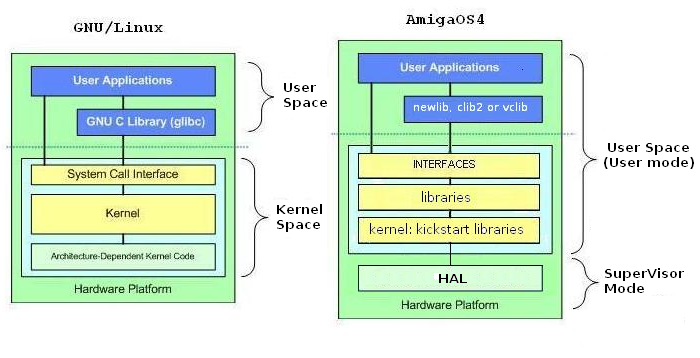
Yet getting close to UNIX or Linux in terms of software or programming tools does not mean that AmigaOS4 behaves in the same way as regards, for example, library initialization, passing arguments or system calls. On AmigaOS4 there are no "system calls" as they are on UNIXes, where you can simply pass arguments to registers and then use an instruction (like "int 0x80h" on x86 Linux, "trap 0" on M68 Linux, or "sc" on some PPC/POWER CPU based OSes), which will cause a software interrupt and enter the kernel in supervisor mode. The concept of AmigaOS is completely different. There is no kernel as such; Amiga's Kickstart is actually a collection of libraries (of which "kernel.kmod" is just one module - a new incarnation of the old exec.library). Also, an AmigaOS program, when calling a library function, won’t enter supervisor mode but rather stays in user mode when the function is executed.
Since the very first version of the OS that came with the Amigas in 1985, you must open a library and use its vector table to execute a library function, so there’s no "system call" involved. The pointer to the first library (exec.library) is always at address 4 and that hasn’t changed in AmigaOS4. By the way, the Quark kernel on MorphOS uses the "sc" instruction for system calls (so it does support them) but the programmers will never use them because they work with the libraries (just like you do on AmigaOS4).
When you program in assembler under AmigaOS4, you cannot do much until you initialize and open all the needed libraries (unlike, for example, on UNIX where the kernel does all the necessary initialisation for you).
2.3 Myth #2: AmigaOS4 binaries are fat This misunderstanding stems from the fact that the latest AmigaOS4 SDK uses a newer version of binutils, which now aligns ELF segments to 64K so that they can be easily loaded with mmap(). Binutils are, naturally, developed with regard to UNIX-like OSes where the mmap() function actually exists so the modifications make sense - but since mmap() isn’t a genuine AmigaOS function (it’s just a wrapper using AllocVec() etc.), this kind of alignment is not needed for AmigaOS.
Luckily, the size difference is only noticeable in small programs, like Hello World, where the resulting executable grows to 65KB. Which of course is unbelievable and looks like something is wrong. But once you start programming for real and produce bigger programs, the code fills up the ELF segments as required, there’s little need for padding, and so there’s little size difference in the end. The worst-case scenario is ~64KB of extra padding, which only happens (as we said) in very small programs, or when you’re out of luck and your code only just exceeds a boundary between two segments.
It is likely that a newer SDK will adapt binutils for AmigaOS4 and the padding will no longer be needed. Currently, to avoid alignment you can use the "-N" switch, which tells the linker to use an ldscript that builds non-aligned binaries. Check the SDK:gcc/ppc-AmigaOS/lib/ldscripts directory; all the files ending with an "n" (like “AmigaOS.xn” or “ELF32ppc.xbn”) are linker scripts that ensure non-aligned builds. Such a script will be used when the GCC compiler receives the “-N” switch. See the following:
7/0.RAM Disk:> type hello.c
#include <stdio.h>
main( )
{
printf ( "aaaa" ) ;
}
6/1.Work:> gcc hello.c -o hello
6/1.Work:> strip hello
6/1.Work:> filesize format=%s hello
65k
6/1.Work:> hello
aaaa
6/1.Work:> gcc -N hello.c -o hello
6/1.Work:> strip hello
6/1.Work:> filesize format=%s hello
5480
6/1.work:> hello
aaaa
2.3 Genuine ELF executables Just like libc, the Executable and Linkable Format (ELF) is a common standard. It is a file format used for executables, objects and shared libraries. It gets the most attention in connection with UNIX but it is really used on numerous other operating systems: all UNIX derivatives (Solaris, Irix, Linux, BSD, etc.), OpenVMS, several OSes used in mobile phones/devices, game consoles such as the PlayStation, the Wii and others. PowerUP, the PPC Amiga kernel made by Phase5 back in the 1990s used the ELF format as well.
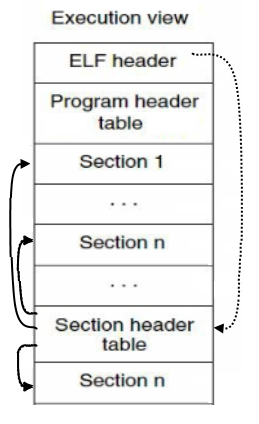
A more detailed description of the ELF internals will be given later; all you need to know for now is that the executable ELF file contains headers (the main header, and headers for the various sections) and sections/segments. The ELF file layout looks like this:
Compared to other Amiga and Amiga-like operating systems, AmigaOS4 uses genuine ELF executables, while for example MorphOS uses relocatable objects (their own BFD backend), which contain the __abox__ symbol.
The advantage of objects is that they are smaller and that relocations are always included. But there is a drawback as well: the linker will not tell you automatically whether all symbols have been resolved because an object is allowed to have unresolved references. (On the other hand, vlink could always detect unresolved references when linking PowerUP and MorphOS objects because it sees them as a new format.) This is why ELF shared objects cannot be used easily (though it’s still kind of possible using some hacks), and it explains why the OS4 team decided to go for real executables.
By specification, ELF files are meant to be executed from a fixed absolute address, and so AmigaOS4 programs need to be relocated (because all processes share the same address space). To do that, the compiler is passed the -q switch ("keep relocations"). Relocations are handled by the MMU, which will create a new virtual address space for each new process.
If you look at the linker scripts provided to build OS4 executables (in the SDK:gcc/ppc-AmigaOS/lib/ldscripts directory), you’ll find the following piece of code:
ENTRY(_start)
....
SECTIONS
{
 PROVIDE (__executable_start = 0x01000000); . = 0x01000000 + SIZEOF_HEADERS;
[...]
As you can see, AmigaOS4 executables look like they are linked to be executed at an absolute address of 0x01000000. But this is only faked; the ELF loader and relocations will recalculate all absolute addresses in the program before it executes. Without relocations, each new process would be loaded at 0x01000000, where it would crash happily due to overwriting certain important areas, and because of other reasons. You may ask why 0x01000000 is used at all, considering that it’s just a placeholder and any number (be it 0x00000000, 0x99999999, 0xDEADBEEF or 0xFEEDFACE) can be used instead. We can speculate and assume that 0x01000000 was chosen because it is the beginning of the memory map accessible for instruction execution. But anyway, the value is currently not important.
To perform a test, let’s see what happens if we build our binary without the "-q" switch (that is, without making the binary relocatable):
7/0.RAM Disk:> type test.c
#include <stdio.h>
main( )
{
printf ( "aaaa" ) ;
}
shell:> gcc test.c -S -o test.s
shell:> as test.s -o test
shell:> ld test.o -o test /SDK/newlib/lib/crtbegin.o /SDK/newlib/lib/LibC.a  /SDK/newlib/lib/crtend.o
When you run the executable, you get a DSI with the 80000003 error, on the 0x1c offset in _start (i.e. the code from the crtbegin.o). Ignoring the error will produce a yellow recoverable alert. The crash occurs because we have compiled an ELF file to be executed at the 0x01000000 address, and as no "-q" switch was used, the remapping did not take place. To better understand why it happens you can check the crtbegin.o code, i.e. the code added to the binary at linking stage, which contains all the OS-dependent initialisations. If you know nothing about PPC assembler you can skip the following part for now and return when you’ve read the entire article:
6/0.RAM Disk:> objdump -D --no-show-raw-insn --stop-address=0x10000d0 test | grep -A8 "_start"
010000b0 < _start>:
10000b0: stwu r1,- 64 ( r1) #
10000b4: mflr r0 # prologue (reserve 64 byte stack frame)
10000b8: stw r0, 68 ( r1) #
10000bc: lis r9, 257 # 257 is loaded into the higher half-word (msw) of r9 (257 << 16)
10000c0: stmw r25, 36 ( r1) # offset into the stack frame
10000c4: mr r25, r3 # save command line stack pointer
10000c8: mr r27, r13 # r13 can be used as small data pointer in the V.4-ABI, and it also saved here
10000cc: stw r5, 20 ( r9) # Write value (257 << 16) + 20 = 0x01010014 to the r5 (DOSBase pointer)
The address in the last instruction points to a data segment starting at 0x010100000. But the address is invalid because, without any relocation, there is no data there and the MMU produces a data storage interrupt (DSI) error.
Of course it is possible to make a working binary without relocation, if the program doesn’t need to relocate and you are lucky enough to have the 0x1000000 address free of important contents. And of course you can use a different address for the entry point, by hex-editing the binary or at build-time using self-made ldscripts. Making a non-relocatable binary will be discussed further in the text.
3. PowerPC assembly In case you are not familiar and have no experience with PowerPC assembly, the following section will explain some basic terms and concepts.
3.1 Registers The PowerPC processor architecture provides 32 general-purpose registers and 32 floating-point registers. We’ll only be interested in certain general-purpose registers and a couple of special ones. The following overview describes the registers as they are used under AmigaOS4 (not UNIX):
3.1.1 General-purpose registers r0
r1
r2
r3
r4
r5
* The contents of registers r3-r5 is only valid when the program starts)
r6 - r10
r11 - r12
r13
[b]r14 - r30 [/b] - registers used for local variables; they are non-volatile; functions have to save and restore them
r31 Important note: This general-purpose register description shows that arguments can only be passed in registers r3 and above (that is, not in r0, r1 or r2). You need to keep that in mind when assembling/disassembling under AmigaOS4.
3.1.2 Some special registers lr
cr
3.2 Instructions There are many different PowerPC instructions that serve many different purposes: there are branch instructions, condition register instructions, instructions for storage access, integer arithmetic, comparison, logic, rotation, cache control, processor management, and so on. In fact there are so many instructions that it would make no sense to cover them all here. You can download Freescale’s Green Book (see the Links section at the end of the article) if you are interested in a more detailed description but we’ll just stick to a number of instructions that are interesting and useful for our purposes.
b Relative branch on address (example: "b 0x7fcc7244"). Note that there are both relative and absolute branches (ba). Relative branches can branch to a distance of -32 to +32MB. Absolute branches can jump to 0x00000000 - 0x01fffffc and 0xfe000000 - 0xfffffffc. However, absolute branches will not be used in AmigaOS programs.
bctr Branch with count register. It uses the count register as a target address, so that the link register with, say, our return address remains unmodified.
lis Stands for "load immediate shifted". The PowerPC instruction set doesn’t allow loading a 32-bit constant with a single instruction. You will always need two instructions that load the upper and the lower 16-bit half, respectively. For example, if you want to load 0x12345678 into register r3, you need to do the following:
lis % r3, 0x1234
ori % r3,% r3, 0x5678
Later in the article you’ll notice that this kind of construction is used all the time.
mtlr "move to link register". In reality this is just a mnemonic for "mtspr 8,r". The instruction is typically used for transferring an address from register r0 to the link register (lr), but you can of course move contents to lr from other registers, not just r0.
stwu "store word and update" (all instructions starting with “st” are for storing). For example, stwu %r1, -16(%r1) stores the contents of register r1 into a memory location whose effective address is calculated by taking the value of 16 from r1. At the same time, r1 is updated to contain the effective address. As we already know, register r1 contains the stack-frame pointer so our instruction stores the contents of the register to a position at offset -16 from the current top of stack and then decrements the stack pointer by 16.
The PowerPC processor has many more instructions and various kinds of mnemonics, all of which are well covered in numerous PPC-related tutorials, so to avoid copying-and-pasting (and wasting space here) we have described a few that happen to be used very often. You’ll need to refer to the relevant documentation if you want to read more about the PowerPC instruction set (see Links below).
3.3 Function prologue and epilogue When a C function executes, its code – seen from the assembler perspective – will contain two parts called the prologue (at the beginning of the function) and the epilogue (at the end of the function). The purpose of these parts is to save the return address so that the function knows where to jump after the subroutine is finished.
stwu % r1,- 16 ( % r1)
mflr % r0 # prologue, reserve 16 byte stack frame
stw % r0, 20 ( % r1)
...
lwz % r0, 20 ( % r1)
addi % r1,% r1, 16 # epilogue, restore back
mtlr % r0
blr
C programmers needn’t worry at all about the prologue and epilogue because the compiler will add them to their functions automatically. When you write your programs in pure assembler you can skip the prologue and the epilogue if you don’t need to keep the return address.
Plus, a new stack frame doesn’t need to be allocated for functions that do not call any subroutine. By the way, the V.4-ABI (application binary interface) defines a specific layout of the stack frame and stipulates that it should be aligned to 16 bytes.
4. Writing programs in assembler There are two ways to write assembler programs under AmigaOS4:
--[i]using libc [/i] (all initializations are done by crtbegin.o/crtend.o and libc is attached to the binary)[i]the old way [/i] (all initializations - opening libraries, interfaces etc. - have to be done manually in the code)
The advantage of using libc is that you can run your code "out of the box" and that all you need to know is the correct offsets to the function pointers. On the minus side, the full library is attached to the binary, making it bigger. Sure, a size difference of ten or even a hundred kilobytes doesn’t play a big role these days – but here in this article we’re going down the old hacking way (that’s why we’re fiddling with assembler at all) so let’s call it a drawback.
The advantage of not using libc is that you gain full control of your program, you can only use the functions you need, and the resulting binary will be as small as possible (a fully working binary can have as little as 100 bytes in size). The drawback is that you have to initialize everything manually.
We’ll first discuss assembler programming with the use of libc.
4.1 Assembler programming using libc To illustrate how this works we’ll compile a Newlib-based binary (the default GCC setting) using the –g switch (“include debugging information”) and then put the GDB debugger on the job:
#include <stdio.h>
main( )
{
printf ( "aaaa" ) ;
exit ( 0 ) ;
}
6/0.RAM Disk:> gcc -gstabs -O2 2.c -o 2
2.c: In function 'main':
2.c:6: warning: incompatible implicit declaration of built-in function 'exit'

6/0.RAM Disk:> GDB -q 2
( GDB) break main
Breakpoint 1 at 0x7fcc7208 : file 2 .c , line 4 .
( GDB) r
Starting program: / RAM Disk/ 2
BS 656d6ed8
Current action: 2
Breakpoint 1 , main ( ) at 2 .c : 4
4 {
( GDB) disas
Dump of assembler code for function main:
0x7fcc7208 < main+ 0 >: stwu r1,- 16 ( r1)
0x7fcc720c < main+ 4 >: mflr r0
0x7fcc7210 < main+ 8 >: lis r3, 25875 ; that addr
0x7fcc7214 < main+ 12 >: addi r3, r3,- 16328 ; on our string
0x7fcc7218 < main+ 16 >: stw r0, 20 ( r1)
0x7fcc721c < main+ 20 >: crclr 4 * cr1+ eq
0x7fcc7220 < main+ 24 >: bl 0x7fcc7234 < printf>
0x7fcc7224 < main+ 28 >: li r3, 0
0x7fcc7228 < main+ 32 >: bl 0x7fcc722c < exit>
End of assembler dump.
( GDB)
Now we’ll use GDB to disassemble the printf() and exit() functions from Newlib’s LibC.a. As mentioned above, Newlib is used by default, there’s no need to use the –mcrt switch unless we want clib2 instead (in which case we’d compile the source with “-mcrt=clib2”).
( GDB) disas printf
Dump of assembler code for function printf :
0x7fcc723c < printf + 0 >: li r12, 1200
0x7fcc7240 < printf + 4 >: b 0x7fcc7244 < __NewLibCall>
End of assembler dump.
( GDB)
( GDB) disas exit
Dump of assembler code for function exit :
0x7fcc7234 < exit + 0 >: li r12, 1620
0x7fcc7238 < exit + 4 >: b 0x7fcc7244 < __NewLibCall>
End of assembler dump.
( GDB)
You can see that register r12 contains some values depending on the function - they are function pointer offsets in Newlib’s interface structure (INewLib). Then there’s the actual jump to __NewLibCall, so let’s have a look at it:
( GDB) disas __NewLibCall
Dump of assembler code for function __NewLibCall:
0x7fcc7244 < __NewLibCall+ 0 >: lis r11, 26006
0x7fcc7248 < __NewLibCall+ 4 >: lwz r0,- 25500 ( r11)
0x7fcc724c < __NewLibCall+ 8 >: lwzx r11, r12, r0
0x7fcc7250 < __NewLibCall+ 12 >: mtctr r11
0x7fcc7254 < __NewLibCall+ 16 >: bctr
End of assembler dump.
( GDB)
Of course you can use "objdump" (like MorphOS developers do):
6/0.RAM Disk:> objdump -d 1 | grep -A5 "<__NewLibCall>
01000280 < __NewLibCall>:
1000280 : 3d 60 01 01 lis r11, 257
1000284 : 80 0b 00 24 lwz r0, 36 ( r11)
1000288 : 7d 6c 00 2e lwzx r11, r12, r0
100028c: 7d 69 03 a6 mtctr r11
1000290 : 4e 80 04 20 bctr
But using GDB is more comfortable: you don’t need to scroll through the full objdump output, or search in it with grep, etc. You can, too, obtain assembler output by compiling the source with the –S switch but GDB makes it possible to get as deep into the code as you wish (in fact down to the kernel level).
We will now remove the prologue (because we don’t need it in this case) and reorganize the code a bit:
.globl main
main:
lis % r3, .msg @ha #
la % r3, .msg @l( % r3) # printf("aaaa");
bl printf #
li % r3, 0 # exit(0);
bl exit #
.msg :
.string "aaaa"
6/0.RAM Disk:> as test.s -o test.o
6/0.RAM Disk:> ld -N -q test.o -o test /SDK/newlib/lib/crtbegin.o /SDK/newlib/lib/LibC.a /SDK/newlib/lib/crtend.o
6/0.RAM Disk:> strip test
6/0.RAM Disk:> filesize format=%s test
5360
6/0.RAM Disk:> test
aaaa
6/0.RAM Disk:>
When we compile our Hello World program in C (with the -N switch and stripping, of course) it is 5504 bytes in size; our assembler code gives 5360 bytes. Nice, but let’s try to reduce it some more (even if we’ll still keep libc attached). Instead of branching to the functions themselves (“bl function”) we’ll use function pointer offsets and branch to __NewLibCall:
.globl main
main:
#printf("aaaa")
lis % r3, .msg @ha # arg1 part1
la % r3, .msg @l( % r3) # arg1 part2
li % r12, 1200 # 1200 - pointer offset to function
b __NewLibCall
#exit(0)
li % r3, 0 # arg1
li % r12, 1620 # 1620 - pointer offset to function
b __NewLibCall
.msg :
.string "aaaa"
6/0.RAM Disk:> as test.s -o test.o
6/0.RAM Disk:> ld -N -q test.o -o test /SDK/newlib/lib/crtbegin.o /SDK/newlib/lib/LibC.a /SDK/newlib/lib/crtend.o
6/0.RAM Disk:> strip test
6/0.RAM Disk:> filesize format=%s test
5336
6/0.RAM Disk:> test
aaaa
6/0.RAM Disk:>
The size is now 5336. We’ve saved 24 bytes, no big deal! Now let’s get real heavy and try to mimic __NewLibCall using our own code:
.globl main
main:
lis % r3, .msg @ha #
la % r3, .msg @l( % r3) # printf("aaaa");
li % r12, 1200
lis % r11, 26006
lwz % r0,- 25500 ( % r11)
lwzx % r11,% r12,% r0 # __NewLibCall
mtctr % r11
bctr
li % r3, 0
li % r12, 1620 # exit
lis % r11, 26006
lwz % r0,- 25500 ( % r11)
lwzx % r11,% r12,% r0 # __NewLibCall
mtctr % r11
bctr
.msg :
.string "aaaa"
It crashes but why? Because lis %r11,26006 and lwz %r0,-25500(%r11) load a pointer from 0x010100024. In the original __NewLibCall code this is a read access to the NewLib interface pointer. But as we already know, we cannot read from the absolute address 0x01010024 because it’s illegal, and the ELF loader must relocate this address to point to the real NewLib interface pointer (INewlib). We didn’t see that before because we used objdump without the "-r" switch (which shows relocations), so let’s use it now:
7/0.RAM Disk:> objdump -dr 1 | grep -A7 "<__NewLibCall>
01000298 < __NewLibCall>:
1000298 : 3d 60 01 01 lis r11, 257
100029a: R_PPC_ADDR16_HA INewlib
100029c: 80 0b 00 24 lwz r0, 36 ( r11)
100029e: R_PPC_ADDR16_LO INewlib
10002a0: 7d 6c 00 2e lwzx r11, r12, r0
10002a4: 7d 69 03 a6 mtctr r11
10002a8: 4e 80 04 20 bctr
So we’ll rewrite our code using the normal interface pointer, and turn the __NewLibCall code into a macro:
.macro OUR_NEWLibCALL
lis % r11, INewlib@ha
lwz % r0, INewlib@l( % r11)
lwzx % r11,% r12,% r0
mtctr % r11
bctr
.endm
.globl main
main:
lis % r3, .msg @ha
la % r3, .msg @l( % r3) # printf("aaaa");
li % r12, 1200
OUR_NEWLibCALL
li % r3, 0
li % r12, 1620 # exit(0);
OUR_NEWLibCALL
.msg :
.string "aaaa"
Works now! Still, after stripping, the size is 5336 bytes but at least the code is fully in our hands and we can play with instructions. It’s time to read some good stuff like the Green Book (see Links below) if you want to do real beefy hacking.
By the way, when we debug our binary, you’ll notice that GCC has put a strangely-looking instruction right before the call to a libc function: crxor 6,6,6 (crclr 4*cr1+eq). This is done in compliance with the ABI specification, which says that before a variadic function is called, an extra instruction (crxor 6,6,6 or creqv 6,6,6) must be executed that sets Condition Register 6 (CR6) to either 1 or 0. The value depends on whether one or more arguments need to go to a floating-point register. If no arguments are being passed in floating-point registers, crxor 6,6,6 is added in order to set the Condition Register to 0. If you call a variadic function with floating-point arguments, the call will be preceded by a creqv 6,6,6 that sets Condition Register 6 to the value of 1.
You may ask where on Earth we got the numerical values (offsets) for the libc functions, i.e. “1200” representing printf() and “1620” representing exit(). For newlib.library, there is no documentation, header files or an interface description in the official AmigaOS4 SDK so you have to find it all out yourself. There are a couple of ways to do it:
--1. Write the program in C and obtain the numbers by disassembling the code (using GDB or objdump). Not much fun but at least you can inspect what arguments are used and in which registers they are stored.
--2. If you only need the list of function offsets you can disassemble the LibC.a file using objdump:
shell:> objdump -dr SDK:newlib/lib/LibC.a
The library only contains stub functions, and output will look like the following:
---- SNIP ----
Disassembly of section .text :
00000000 < realloc>:
0 : 39 80 01 64 li r12, 356
4 : 48 00 00 00 b 4 < realloc + 0x4 >
4 : R_PPC_REL24 __NewLibCall
stub_realpath.o : file format ELF32- AmigAOS
Disassembly of section .text :
00000000 < realpath>:
0 : 39 80 0c 00 li r12, 3072
4 : 48 00 00 00 b 4 < realpath+ 0x4 >
4 : R_PPC_REL24 __NewLibCall
stub_recv.o : file format ELF32- AmigaOS
---- SNIP ----
You can write a simple script that will parse the disassembly and give you the list in any form you wish.
4.2 Assembler programming without libc If you want to write programs without using the C standard library, your code should do what runtime objects would normally take care of: that is, initialize all the necessary system-related stuff. It is almost the same as on the old AmigaOS3.x, only with some OS4-specific parts. This is what you should do:
As of now, we can no longer use printf() because it’s a libc function - if we want to produce a really small binary, we cannot afford the luxury of attaching the entire libc to be able to use printf() only! Instead, we need to use the AmigaOS API: in this particular case, the Write() function from dos.library.
There is a Hello World example written by Frank Wille for his assembler 'vasm'; I’ll adapt it for the GNU assembler ('as') in order to make the article related to one compiler. (Both the original and the adapted version can be found in the archive that comes with the article):
# ExecBase
.set ExecBase, 4
.set MainInterface, 632
# Exec Interface
.set Obtain, 60
.set Release, 64
.set OpenLibrary, 424
.set CloseLibrary, 428
.set GetInterface, 448
.set DropInterface, 456
# DOS Interface
.set Write, 88
.set Output, 96
.macro CALLOS reg, val # Interface register, function offset
lwz % r0, \val( \reg)
mr % r3, \reg
mtctr % r0
bctrl
.endm
.text
.global _start
_start:
mflr % r0
stwu % r1,- 32 ( % r1)
stmw % r28, 8 ( % r1)
mr % r31,% r0
# get SysBase
li % r11, ExecBase
lwz % r3, 0 ( % r11)
# get Exec-Interface
lwz % r30, MainInterface( % r3) # r30 IExec
# IExec->Obtain()
CALLOS % r30, Obtain
# open dos.library and get DOS-Interface
# IExec->OpenLibrary("dos.library",50)
lis % r4, dos_name@ha
addi % r4,% r4, dos_name@l
li % r5, 50
CALLOS % r30, OpenLibrary
mr. % r28,% r3 # r28 DOSBase
beq release_exec
# IExec->GetInterface(DOSBase,"main",1,0)
mr % r4,% r28
lis % r5, main_name@ha
addi % r5,% r5, main_name@l
li % r6, 1
li % r7, 0
CALLOS % r30, GetInterface
mr. % r29,% r3 # r29 IDOS
beq close_dos
# IDOS->Output()
CALLOS % r29, Output
# IDOS->Write(stdout,"Hello World!\n",13)
mr % r4,% r3
lis % r5, hello_world@ha
addi % r5,% r5, hello_world@l
li % r6, hello_world_end- hello_world
CALLOS % r29, Write
# IExec->DropInterface(IDOS)
mr % r4,% r29
CALLOS % r30, DropInterface
close_dos:
# IExec->CloseLibrary(DOSBase)
mr % r4,% r28
CALLOS % r30, CloseLibrary
release_exec:
# IExec->Release()
CALLOS % r30, Release
# exit(0)
li % r3, 0
mtlr % r31
lmw % r28, 8 ( % r1)
addi % r1,% r1, 32
blr
.rodata
dos_name:
.string "dos.library"
main_name:
.string "main"
hello_world:
.string "Hello World!"
hello_world_end:
If you did assembler programming under AmigaOS 3.x, you can see that the logic is the same, just the assembler is different and some OS4-specific bits and pieces (the interface-related stuff) have been added. Now let’s compile and link the source and then strip the binary to see how our “slimming diet” works:
6/0.Work:> as hello.s -o hello.o
6/0.Work:> ld -q hello.o -o hello
6/0.Work:> strip hello
6/0.Work:> filesize format=%s hello
4624
Right, so we got down to 4624 bytes. A little better when compared with the libc version (which was 5336 in size), but still too much for a Hello World program.
To obtain the numerical values that identify system functions, you need to study the interface description XML files that are provided in the AmigaOS4 SDK. For example, for exec.library functions you need to read the file “SDK:include/interfaces/exec.xml”. All interfaces contain a jump table. The offset for the first interface "method" is 60, the next one is 64 and so on. So you just open the appropriate interface description XML file, start counting from 60, and add +4 for any method that follows.
5. Hacking it for real 5.1 Linker scripts (ldscripts) Every time you perform linking to produce an executable, the linker uses a special script called ldscript (pass the “-verbose” argument to see which one is used by default). The script is written in the linker’s command language. The main purpose of the linker script is to describe how the sections in the input file(s) should be mapped into the output file, and to control the memory layout of the output file. Most linker scripts do nothing more that that, but – should you have the need – the script can also direct the linker to perform other operations, using the available set of commands in the command language. To provide your own, custom script to the linker, the "-T" switch is used. (By the way, the "-N" switch, mentioned earlier and used to make non-aligned executables, also affects the choice of the default linker script.)
What does all of that mean for us and how is it related to this article? Well, when you read the ldscripts documentation (see Links below), you can build your own ldscript that will only create the necessary sections. That is: we can produce a minimum working executable and thus get rid of parts that even 'strip' wouldn’t be able to remove.
So following the first-test example from the ldscript documentation, we’ll write our own script now:
 SECTIONS
 {
   . = 0x00000000;
   .text           : { *(.text) }
 }
But why did we put 0x00000000 here as the entry point of the code? Well as we discussed earlier, the address is just a placeholder so it has no real meaning under AmigaOS4 (the ELF loader will perform relocation and calculate the proper address). Nevertheless, the address value is used when the ELF binary is created, and it can make a difference as regards the executable size because of paging. So, let’s compile our non-libc assembler code and provide our custom linker script:
 shell:> as hello.s -o hello.o
 shell:> ld -Tldscript -q -o hello hello.o
 shell:> stat -c=%s hello
 =66713
OMG! 66 kilobytes! But that was quite expected, considering the entry point address we have provided. You can now play with the address value to see what difference in the executable size it makes. For example, if you try 0x11111111, the size of the binary is 5120 bytes; 0xAAAAAAAA will result in 44440 bytes. Apparently, this generally meaningless address does make a difference because it affects paging. So all we need to do is choose a value that will, hopefully, avoid any kind of paging. We can consult the ldscripts manual again and we’ll find this:
SIZEOF_HEADERS: Returns the size in bytes of the output file’s headers. You can use this number as the start address of the first section, to facilate paging.
This looks like the thing we need, so:
SECTIONS
 {
   . = SIZEOF_HEADERS;
   .text           : { *(.text) }
 }
 shell:> as hello.s -o hello.o
 shell:> ld -Tldscript -q -o hello hello.o
 shell:> stat -c=%s hello
 =1261

 shell:> strip hello
 shell:> stat -c=%s hello
 =832

 shell:> hello
 Hello World!
 shell:>
832 bytes of size and works!
5.2 Getting rid of relocation
7/0.Work:> readelf -S hello
There are 7 section headers, starting at offset 0x198:

Section Headers:
  [Nr] Name	Type			Addr     Off    Size   ES Flg Lk Inf Al
  [ 0] 		 NULL		00000000 000000 000000 00      0   0  0
  [ 1] .text             PROGBITS        00000054 000054 0000f8 00  AX  0   0  1
  [ 2] .rela.text        RELA            00000000 0002f8 000048 0c      5   1  4
  [ 3] .rodata           PROGBITS        0000014c 00014c 00001e 00   A  0   0  1
  [ 4] .shstrtab         STRTAB          00000000 00016a 00002e 00      0   0  1
  [ 5] .symtab           SYMTAB          00000000 0002b0 000040 10      6   3  4
  [ 6] .strtab           STRTAB          00000000 0002f0 000008 00      0   0  1
Key to Flags:
  W (write), A (alloc), X (execute), M (merge), S (strings)
  I (info), L (link order), G (group), x (unknown)
  O (extra OS processing required) o (OS specific), p (processor specific)

7/0.Work:>
As you can see there are some sections that should be relocated:--1. .rela.text - relocations for .text.--2. .rodata - data (our strings like "helloworld", "dos.library", etc)And the next three sections (.shstrtab, .symtab and .strtab) are stanadard in the AmigaOS4 implementation of ELF, as the AmigaOS4 ELF loader requires them. Usually the linker ('ld' or 'vlink', does not matter) would remove .symtab and .strtab, when the "-s" option is used at linking stage, but whilst that is true for UNIX, it's not true not for AmigaOS4 because the AmigaOS4 ELF loader needs the _start symbol to find the program entry point, so we can't delete those two sections. As for .shstrtab, we can't delete it either because we still need the sections (we will discuss why later).
So what about .rela.text and .rodata? Well, they can be removed by modifing our code a bit, to avoid any relocations (thanks to Frank again). We place the data to the .text section, together with the code. So the distance between the strings and the code is constant (kind of like base-relative addressing). With "bl initbase" we jump to the following instruction while the CPU places the address of this instruction into LR. This is the base address which we can use:
# non-relocated Hello World
# by Frank Wille, janury 2012
# adapted for "as" by kas1e
# ExecBase
.set MainInterface, 632
# Exec Interface
.set Obtain, 60
.set Release, 64
.set OpenLibrary, 424
.set CloseLibrary, 428
.set GetInterface, 448
.set DropInterface, 456
# DOS Interface
.set Write, 88
.set Output, 96
.macro CALLOS reg, val # Interface register, function offset
lwz % r0, \val( \reg)
mr % r3, \reg
mtctr % r0
bctrl
.endm
.text
.global _start
_start:
mflr % r0
stw % r0, 4 ( % r1)
stwu % r1,- 32 ( % r1)
stmw % r28, 8 ( % r1)
# initialize data pointer
bl initbase
initbase:
mflr % r31 # r31 initbase
# get Exec-Interface
lwz % r30, MainInterface( % r5) # r30 IExec
# IExec->Obtain()
CALLOS % r30, Obtain
# open dos.library and get DOS-Interface
# IExec->OpenLibrary("dos.library",50)
addi % r4,% r31, dos_name- initbase
li % r5, 50
CALLOS % r30, OpenLibrary
mr. % r28,% r3 # r28 DOSBase
beq release_exec
# IExec->GetInterface(DOSBase,"main",1,0)
mr % r4,% r28
addi % r5,% r31, main_name- initbase
li % r6, 1
li % r7, 0
CALLOS % r30, GetInterface
mr. % r29,% r3 # r29 IDOS
beq close_dos
# IDOS->Output()
CALLOS % r29, Output
# IDOS->Write(stdout,"Hello World!\n",13)
mr % r4,% r3
addi % r5,% r31, hello_world- initbase
li % r6, hello_world_end- hello_world
CALLOS % r29, Write
# IExec->DropInterface(IDOS)
mr % r4,% r29
CALLOS % r30, DropInterface
close_dos:
# IExec->CloseLibrary(DOSBase)
mr % r4,% r28
CALLOS % r30, CloseLibrary
release_exec:
# IExec->Release()
CALLOS % r30, Release
# exit(0)
li % r3, 0
lmw % r28, 8 ( % r1)
addi % r1,% r1, 32
lwz % r0, 4 ( % r1)
mtlr % r0
blr
dos_name:
.string "dos.library"
main_name:
.string "main"
hello_world:
.string "Hello World!"
hello_world_end:
 6/0.Work:> as hello.s -o hello.o
 6/0.Work:> ld -Tldscript hello.o -o hello
 6/0.Work:> strip hello
 6/0.Work:> stat -c=%s hello
 =644

 6/0.Work:> hello
 Hello World!
 6/0.Work:>
644 bytes of size, and still works. If we check the sections in the binary now, we'll see that currently it only contains the .text section and the three symbol-related sections that are required in AmigaOS4 binaries:
6/0.Work:> readelf -S hello
There are 5 section headers, starting at offset 0x184:

Section Headers:
  [Nr] Name              Type            Addr     Off    Size   ES Flg Lk Inf Al
  [ 0]                   NULL            00000000 000000 000000 00      0   0  0
  [ 1] .text             PROGBITS        10000054 000054 00010e 00  AX  0   0  1
  [ 2] .shstrtab         STRTAB          00000000 000162 000021 00      0   0  1
  [ 3] .symtab           SYMTAB          00000000 00024c 000030 10      4   2  4
  [ 4] .strtab           STRTAB          00000000 00027c 000008 00      0   0  1
Key to Flags:
  W (write), A (alloc), X (execute), M (merge), S (strings)
  I (info), L (link order), G (group), x (unknown)
  O (extra OS processing required) o (OS specific), p (processor specific)

6/0.Work:>
5.3 The ELF loader If you want to understand the internals of the ELF format, the best book of reference is the ELF specification (see Links), where you can find everything about headers, sections, segments, section headers and so on. But of course it is only a specification and so it does not cover ELF loaders and parsers, which are implemented differenty on different operating systems. While the implementation does not vary too much among UNIXes, the ELF loader in AmigaOS4 is rather specific.
Let's briefly cover the parts an ELF executable contains:
Although it may seem that sections and segments are the same thing, this is not the case. Sections are elements of the ELF file. When you load the file into memory, sections are joined to form segments. Segments are file elements too but they are loaded to memory and can be directly handled by the loader. So you can think of sections as segments, just you should know that segments are something that executes in memory, while sections is the material from which segments are built in memory.
This is what our 644-byte Hello World example looks like, with the various parts defined by the ELF specification highlighted in different colours (press on image to have original size) :
Every part of an ELF file (be it the ELF header, segments header, or any other part) has a different structure, described in depth in the ELF specification. For a better understanding, let‘s describe the ELF header (the first part in the image above, highlighted in dark green):
  db 0x7f, "ELF"         ; magic
  db 1,2,1               ; 32 bits, big endian, version 1
  db 0,0,0,0,0,0,0,0,0   ; os info

  db 0,2                 ; e_type (for executable=2)
  db 0,0x14              ; 14h = powerpc.
  db 0,0,0,1             ; version (always must be set to 1)
  dd 0x10000054          ; entry point (on os4 make no sense)
  dd 0x00000034          ; program header table file offset in bytes
  dd 0x00000184          ; section header table file offset in bytes
  db 0,0,0,0             ; e_flag   - processor specific flags
  db 0,0x34              ; e_ehsize - size of ELF header in bytes


  db 0,0x20              ; e_phentsize - size of one entry in bytes, of program header table (all the entries are the same size)
  db 0,2                 ; e_phnum - number of entires in the program header table.

  db 0,0x28              ; e_shentsize - section headers size in bytes
  db 0,5                 ; e_shnum - number of entires in the section header table
  db 0,2                 ; e_eshstrndx - section header table index of the entry assosiated with the section name string table
When you try to execute a program, the ELF loader first checks if it's a genuine ELF binary or not. Depending on the result, the loading of the executable is either allowed or denied. Once loaded in memory, code from the respective segments is executed. As I said before, the necessary fields are parsed differently on different operating systems. For example under Linux, the loader parses the ELF structure going into greater depth compared to the AmigaOS4 loader. Still there is some common ground; on both OSes you can, for instance, write anything you want to the "os info" field. On AmigaOS4 you can fully reuse more fields, and here is how the OS4 ELF loader parses the ELF headers:
     * magic (first 7 bytes): db 0x7f,"ELF", 0x01,0x02,0x01 (100% required)
     * all the subsequent fields are not parsed at all and can contain any data, until the loader reaches the section header tables' file offset in bytes field (required)
     * then again there can be any data, until e_phnum (the number of entires in the program header table, which is required as well)
     * and then the next 8 bytes of info (4 fields) about section headers/sections are required
Take a look at the image below, which shows an ELF header in which all unparsed bytes are marked by "A" letters. You can use these bytes for anything you want.
But please bear in mind that doing so would breach the specification. The fact that it works now doesn't mean it will also work with the next version of the ELF loader, as the AmigaOS4 developers could use the currently unparsed fields for something meaningful in the future.
The ELF header is not the only place where you can insert (at least with the current version of the loader) your own data. After the ELF header there come program headers (i.e. headers that describe segments). In our particular case we have one program section header for the .text segment. And here comes the suprise: the AmigaOS4 ELF loader does not parse the program headers at all! Instead, the parsing is done in sections and section headers only. Apparently, the OS4 loader does something that on UNIXes is normally put in the ELF executable and the loader just gets data from it. But under AmigaOS4 this is not the case. Although the ELF binary produced by GCC is built correctly and according to specification, half of the sections and many fields are not used under OS4.
So the programs section headers can fully be used for your own needs. We can remove section names completely (and give them, for example, an "empty" name by writing 0 string-offset in the sh_name field of each section header entry). But .shstrtab must still be kept, with a size of 1 byte. A NULL section header can be reused too (you can see that a NULL section header comes after the .shrstab section, so we have plenty of space). Check the file "bonus/unused_fields/hello" to see which areas can be reused (these are indicated by 0xAA bytes).
Now it‘s clear that we can manipulate sections (i.e. delete empty ones and those ignored by the ELF loader) and recalculate all the addresses in the necessary fields. To do that you will really need to dig into the ELF specification. For example, you can put the _start label to any suitable place (such as the ELF header, or right at the begining of an ignored field) and then just put the adjusted address in the .strtab section offset field. This way you can save 8 bytes, so the size of our binary is now 636 bytes. Then there is the .symtab section at the end of the file, which is 48 bytes long. We can put it right in the place of .shstrtab (34 bytes in our case) and in the following part of the NULL section header (so as to squeeze the remaining 14 bytes in). Just like this (press on image to see it in full size) :
As a result, the size of our binary becomes mere 588 bytes, and the executable still works of course. Tools like 'readelf' will surely be puzzled by such custom-hacked ELF files, but we only need to worry about what the ELF loader thinks about them. If the loader is happy, the binary is working and the code is executed in memory.
In the bonus directory that comes with this article, you can try out an example binary the altered structure of which is depicted by the image above. In the binary, .strtab (the _start symbol) is moved to the program section header, and .symtab is moved on top of .shstrtab + the NULL section header (see directory "bonus/shift_sections").
6. Final Words
The article, of course, aims at encouraging learning. If you are an application programmer, you'll probably never need to use assembler directly or construct ELFs from scratch byte per byte. But the knowledge of how things work at low level can help you understand and resolve many problems that may turn up from time to time and that are related to compilers, linkers and assembler-code parts. Also, it can give you a better overview of the AmigaOS4 internals so when you start a project, it will be much easier for you to get rid of problems: without asking questions in the forums and losing hours fiddling with the basics.
7. Links ELF specification : http://flint.cs.yale.edu/cs422/doc/ELF_Format.pdfPPC SYSV4 ABI.pdf : http://refspecs.linuxbase.org/elf/elfspec_ppc.pdfGreen Book (MPCFPE32B.pdf) : http://www.freescale.com/files/product/doc/MPCFPE32B.pdfGDB.txt : http://www.gnu.org/s/GDB/documentation/Linker Scripts : http://sourceware.org/binutils/docs/ld/Scripts.html#Scripts
ps. you also can get the PDF version of that article (see attach), or download it here




 the_hacking_way._part_1._first_steps.zip
Comments
Submitted by Belxjander on
Is there a new location for the PPC SYSV4 ABI pdf specification?
as trying the link here reports some kind of error about it having moved
Just a heads up...